How to measure packet timing and interpret the results.
What the Appliance Measures
The appliance measures packet inter-arrival time: the time between consecutive packets arriving at a data port.
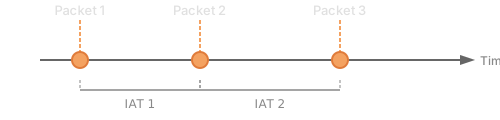
IAT (Inter-Arrival Time) is the fundamental measurement. From this, the appliance derives:
- Mean IAT: Average time between packets
- Jitter: Variation in IAT (packet delay variation)
- Min/Max: Extreme values in the measurement window
- Percentiles: P50, P95, P99 for distribution analysis
Hardware Timestamping
Both appliances use NICs with hardware timestamping capability:
| Model | NIC | Timestamp Resolution |
|---|---|---|
| JT-10.1 | Intel X710 | Sub-microsecond |
| JT-1.1 | Intel i226-V | Sub-microsecond |
Hardware timestamps are captured at the NIC, before kernel processing. This eliminates software timing jitter and provides accurate measurements regardless of CPU load.
Measurement Workflow
1. Connect to Traffic
Deploy the appliance inline or passive (see Network Setup).
2. Select the Data Port
In the web interface, choose which port to monitor (eth0 or eth1).
3. Configure Filters (Optional)
By default, all traffic is measured. Apply filters to focus on specific flows:
- Protocol: TCP, UDP, ICMP
- Port number: e.g., 5004 for RTP, 443 for HTTPS
- IP address: Source or destination
4. Start Measurement
Measurement begins automatically when traffic is present. The real-time chart updates continuously.
5. Analyze Results
- Watch the live chart for patterns and anomalies
- Review statistics for summary values
- Use the histogram for distribution analysis
Interpreting Results
Consistent Traffic
For periodic traffic (e.g., video frames, sensor data):
Expected IAT: 33.3 ms (30 fps video)
Observed: Mean 33.2 ms, Std Dev 0.1 ms

✓ Traffic is consistent
Jitter
Variation in timing indicates jitter:
Expected IAT: 33.3 ms
Observed: Mean 33.3 ms, Min 28 ms, Max 42 ms

⚠ Jitter present (14 ms peak-to-peak)
High jitter may cause:
- Video stuttering or tearing
- Audio glitches
- Control system timing errors
Bursts
Traffic arriving in bursts shows bimodal distribution:
Observed: Many packets at ~0.1 ms IAT, some at ~100 ms

⚠ Burst pattern detected
This may indicate:
- Buffering in upstream equipment
- TCP congestion window behavior
- Application-level batching
Outliers
Occasional high-IAT values (spikes):
Mean: 10 ms, P99: 12 ms, Max: 150 ms

⚠ Outliers present
Outliers may indicate:
- Network congestion events
- Switch buffer overflow
- Processing delays in endpoints
Common Measurements
Video Streaming (30 fps)
| Metric | Expected | Concern Threshold |
|---|---|---|
| Mean IAT | 33.3 ms | > 34 ms |
| Jitter (P99-P50) | < 1 ms | > 5 ms |
| Max IAT | < 40 ms | > 50 ms |
VoIP (20 ms packetization)
| Metric | Expected | Concern Threshold |
|---|---|---|
| Mean IAT | 20 ms | > 21 ms |
| Jitter | < 2 ms | > 10 ms |
| Loss | 0% | > 0.1% |
Industrial Control (1 ms cycle)
| Metric | Expected | Concern Threshold |
|---|---|---|
| Mean IAT | 1 ms | > 1.1 ms |
| Max IAT | < 1.5 ms | > 2 ms |
| Jitter | < 0.1 ms | > 0.5 ms |
Tips for Accurate Measurement
-
Isolate the path — Measure one segment at a time to locate problems
-
Use hardware timestamps — Software timestamps add measurement noise
-
Measure long enough — Short measurements may miss rare events; run for minutes or hours
-
Compare baselines — Establish normal behavior before testing changes
-
Check both directions — Asymmetric paths may have different characteristics
-
Consider packet size — Small packets may show more jitter due to serialization
Exporting Data
Measurement data can be exported for offline analysis:
- PCAP capture: Full packet data with timestamps
- Statistics export: Summary statistics in CSV format
- API access: Programmatic access to real-time data
Further Reading
For detailed information about timing analysis features, see the JitterTrap documentation.