You're hearing intermittent clicks and dropouts. The stream meters look fine, PTP is locked, but every few minutes there's a glitch. By the time you check the monitoring, everything looks normal again.
How do you catch a problem that only happens once an hour—and prove it's the network?
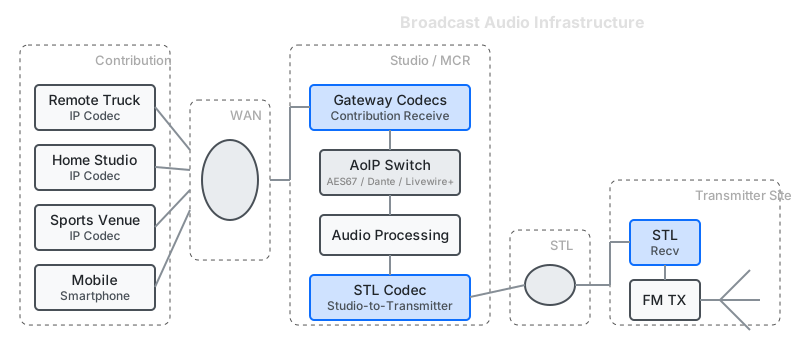
The Problem with Intermittent Glitches
Audio-over-IP timing requirements are unforgiving. AES67 sends a packet every 1 ms (48 samples at 48 kHz). A packet that arrives 5 ms late is as bad as lost—it misses the playout deadline and gets discarded.
The jitter buffer trades latency for tolerance: a 4-packet buffer gives you 4 ms of margin. But for live applications—IFB, talkback, low-latency monitoring—you can't buffer your way out of the problem.
Unlike video where a lost packet might cause a brief artifact, a lost audio packet creates a distinct click or pop. Your listeners hear it. Your talent hears it in their IFB. But standard network monitoring shows everything fine.
Catching the Glitch
The JT-10.1 sits inline on the audio stream path, monitoring packet timing continuously. You set a threshold—say, inter-packet gap exceeding 2 ms when you expect 1 ms packets. When that threshold is violated:
- Trap triggers — the timing anomaly is detected
- Ring buffer captures — the last 30 seconds of traffic is saved to a pcap file
- You have evidence — timestamps showing exactly when and how the network failed
The capture goes to Wireshark. Now you can see the RTP sequence numbers, identify which packets were delayed or lost, and correlate network timing with the audio glitch.
You don't have to be listening. Set the trap, leave it running through the show, come back to evidence.
Example Thresholds for Broadcast Audio
| Packet Interval | Expected Gap | Trap Threshold |
|---|---|---|
| AES67 (1 ms) | 1.0 ms | > 2 ms |
| AES67 (125 µs) | 0.125 ms | > 0.5 ms |
| Dante (1 ms) | 1.0 ms | > 2 ms |
Set the threshold above your jitter buffer capacity. When the trap fires, you know the network delivered something the receiver couldn't handle.
Bridging the IT/AV Knowledge Gap
Audio-over-IP sits at the intersection of two disciplines. AV engineers understand audio; IT engineers understand networks. When something glitches, each team suspects the other's domain.
The JT-10.1 provides objective evidence both teams can read:
- Packet timing data — shows exactly when latency fluctuations occurred
- pcap files — open in Wireshark for deep analysis by either team
- Threshold violations — clear pass/fail criteria tied to audio requirements
Instead of "the network seems fine" versus "the audio gear is flaky," you have timestamped evidence showing what the network actually delivered. The data speaks for itself.
Verifying QoS Is Actually Working
You configured DSCP markings. The switch has QoS policies. But is audio traffic actually getting priority?
The JT-10.1 answers this directly:
- Measure baseline timing with only audio traffic
- Add competing traffic (file transfers, video streams)
- Compare: does audio timing stay consistent, or does it degrade?
If QoS is working, audio packet timing should remain stable even under load. If timing degrades, the switch isn't prioritizing correctly—or there's a configuration gap somewhere in the path.
Isolating the Problem: Network or Receiver?
The audio glitches. Is it the network, or the receiving device?
The JT-10.1 sits at the boundary. It sees exactly what the network delivers:
-
Network timing looks clean, but audio still glitches? The problem is downstream—the receiver's NIC, driver, CPU load, or buffer configuration. The network delivered the packets; something on the receiver failed to process them.
-
Network timing shows latency fluctuations, gaps, or loss? The problem is upstream—switches, cabling, competing traffic, or the WAN link. The receiver never had a chance.
This isolates the fault domain. Instead of "it's glitching somewhere," you know which team owns the fix—and you have the pcap to prove it.
Stress Testing Before Deployment
Media-over-IP protocols must perform "under varying network conditions"—but you can't wait for those conditions to appear in production. The JT-10.1 creates them deliberately.
Finding jitter tolerance:
- Codec works in the lab, but what about the WAN link?
- Inject increasing latency fluctuations until audio glitches
- Document: "System tolerates up to X ms jitter before audible artifacts"
Testing redundancy switching:
- ST 2022-7 seamless protection switching—does it actually work?
- Inject 100% packet loss on one path
- Verify seamless switchover, test both directions
STL link qualification:
- The telco says the link is fine. You hear glitches.
- Measure baseline timing, identify outliers
- Document evidence for the telco discussion
Validating new infrastructure:
- Upgrading switches or adding capacity
- Run the same stress test before and after
- Quantify the difference
QoS verification:
- Inject competing traffic while measuring audio timing
- Confirm priority queuing is working as configured
- Find the point where QoS breaks down
Certification and compliance testing:
- ST 2110 requires rigorous testing before deployment
- Stress test under controlled conditions before formal certification
- Document network tolerance for compliance reports
Protocol-Agnostic Testing
The JT-10.1 works at the packet level, not the protocol level. This means the same tool and methodology works across:
- AES67
- SMPTE ST 2110-30/31
- Dante
- NDI (noted for congestion sensitivity)
- Livewire+
- Ravenna
Why this matters: You can compare how different protocols behave under identical stress conditions. Same network impairment profile, different protocols—which one degrades more gracefully?
When evaluating protocols for a new facility or comparing vendor solutions, the JT-10.1 provides an objective, repeatable test environment.
When Network Testing Matters
A direct connection between devices on a dedicated switch rarely has timing problems.
Network testing becomes relevant when:
- Shared infrastructure — audio shares bandwidth with video, file transfers, or IT traffic
- WAN/STL links — telco circuits with variable latency
- Multi-stream aggregation — many audio streams through common switches
- Facility buildouts — new infrastructure needs validation
- Intermittent field issues — need to capture evidence of reported problems
- IT/AV collaboration — need objective data to resolve cross-team disputes
Reference: Audio Timing
AES67 / SMPTE ST 2110-30 Packet Rates
| Sample Rate | Packet Time | Packets/sec | Bandwidth (stereo) |
|---|---|---|---|
| 48 kHz | 1 ms | 1,000 | 2.3 Mbps |
| 48 kHz | 125 µs | 8,000 | 2.3 Mbps |
| 96 kHz | 1 ms | 1,000 | 4.6 Mbps |
Note: Bandwidth is low, but timing tolerance is tight. A 1 Gbps link with 0.01% packet loss drops 100 audio packets per second.
Jitter Budget
| Buffer Depth | Tolerance | Latency Added |
|---|---|---|
| 1 packet | 1 ms | 1 ms |
| 2 packets | 2 ms | 2 ms |
| 4 packets | 4 ms | 4 ms |
For live applications (IFB, talkback), buffer depth is minimized. There's no margin for network jitter.
The Workflow
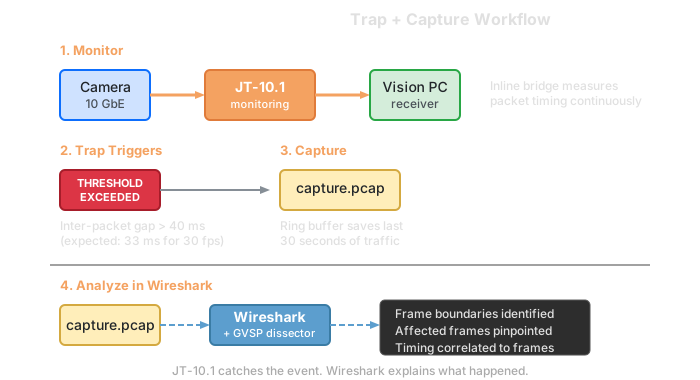
The JT-10.1 catches the event and preserves evidence. Wireshark decodes RTP sequence numbers and timestamps. Your audio monitoring confirms what the audience heard.
Complementary Tools
| Tool | What It Does |
|---|---|
| Wireshark | Decode captured packets, RTP sequence analysis |
| PHABRIX Qx/Sx | SMPTE 2110 compliance, PTP analysis |
| Leader LV5600 | SDI/IP waveform monitoring |
| PacketStorm VIP | Media-over-IP stream verification |
| Dante Controller | Dante network configuration and monitoring |
Test Setup
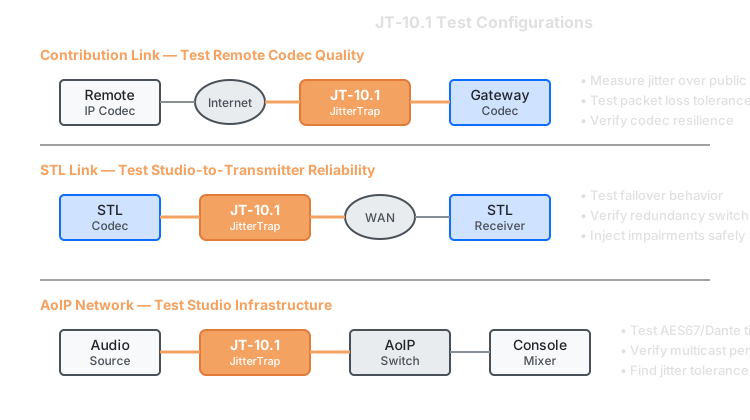
The JT-10.1 deploys inline as a transparent bridge. All traffic passes through while timing is measured and thresholds are monitored.
Studio links: Position between audio devices and network switch.
STL/WAN: Position at the facility edge to measure what the telco delivers.
Aggregation points: Position between core switch and destination to see combined stream behavior.
Supported Protocols
| Protocol | Transport | Status |
|---|---|---|
| AES67 | UDP/RTP over IP | Supported — packet timing measurement |
| SMPTE ST 2110-30/31 | UDP/RTP over IP | Supported — packet timing measurement |
| Dante | UDP over IP | Supported — packet timing measurement |
| NDI | UDP/TCP over IP | Supported — congestion-sensitive, good candidate for stress testing |
| Livewire+ | UDP over IP | Supported — packet timing measurement |
| Ravenna | UDP/RTP over IP | Supported — packet timing measurement |
| IEEE 1588 (PTP) | UDP | Timing measured, but PTP decode requires specialized tools |
The JT-10.1 measures packet timing for any IP traffic. It doesn't decode RTP payload or verify PTP sync—that's what broadcast analyzers are for.
What This Won't Help With
- PTP synchronization issues — packet timing is measured, but PTP decode needs specialized tools
- Audio content problems — silence, phase, level issues are in the payload, not the network
- Non-IP audio — MADI, AES3, analog
Debugging intermittent audio glitches? Contact us to discuss your setup.