The PLC faults intermittently. It runs fine for days, then drops the connection to the HMI. The switch logs show nothing. The PLC diagnostics say "communication timeout." By the time you're on site, everything is working again.
How do you catch a problem that only happens once a week?
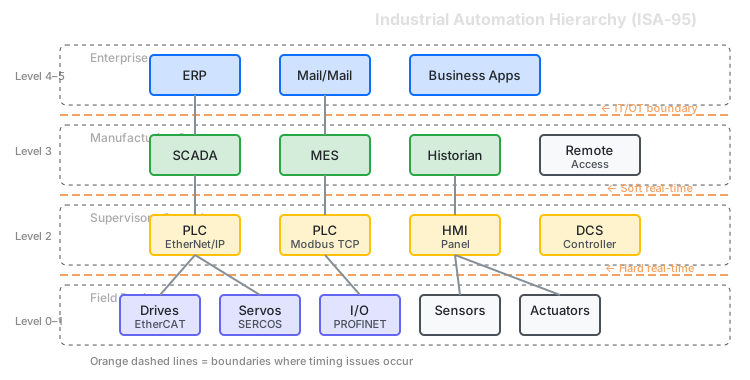
The Problem with Intermittent Faults
Industrial TCP/IP protocols have timeouts. EtherNet/IP connections expect packets every RPI interval (typically 10–100 ms). Modbus TCP clients timeout after 1–5 seconds of no response. OPC UA subscriptions have publishing deadlines.
When network conditions degrade—latency spikes, packet loss, jitter from broadcast storms—these timeouts trigger. The PLC faults, the HMI loses connection, production stops. Common causes:
- ARP storms or broadcast floods
- Faulty switches or firmware bugs
- SCADA failover traffic bursts
- Large historian/ERP data transfers
- EMI from motor starts or welding
Standard network monitoring shows "everything fine" between events. The problem is real, but you can't catch it happening.
Catching the Fault
The JT-10.1 sits inline between PLC and switch—or between switch and HMI—monitoring packet timing continuously. You set a threshold based on the protocol's timeout. When that threshold is violated:
- Trap triggers — the timing anomaly is detected
- Ring buffer captures — the last 30 seconds of traffic is saved to a pcap file
- You have evidence — timestamps showing exactly when and how the network failed
The capture goes to Wireshark with protocol dissectors. Now you can see which CIP connection timed out, which Modbus transaction failed, which OPC UA subscription missed its deadline.
You don't have to be watching. Set the trap, let it run for a week, come back to evidence.
Example Thresholds for Industrial Protocols
| Protocol | Typical Timeout | Trap Threshold |
|---|---|---|
| EtherNet/IP (10 ms RPI) | 40 ms (4× RPI) | > 30 ms gap |
| EtherNet/IP (100 ms RPI) | 400 ms | > 300 ms gap |
| Modbus TCP | 1–5 s | > 500 ms RTT |
| OPC UA (100 ms publish) | 300 ms | > 200 ms gap |
Set the threshold below the protocol's timeout. When the trap fires, you've caught the network event that would have caused the fault.
Isolating the Problem: Network or Controller?
The connection drops. Is it the network, or the PLC/HMI?
The JT-10.1 sits at the boundary. It sees exactly what the network delivers:
-
Network timing looks clean, but connection still drops? The problem is in the endpoint—PLC CPU load, HMI application, or configuration issue. The network delivered the packets on time.
-
Network timing shows gaps, jitter, or loss? The problem is upstream—switches, cabling, or competing traffic. The endpoint timed out because the network didn't deliver.
This isolates the fault domain. Instead of "something dropped the connection," you know whether it's a network problem or a controls problem—and you have the pcap to prove it.
Stress Testing Before Deployment
Beyond catching intermittent issues, the JT-10.1 can deliberately inject network impairments:
Finding margins:
- Acceptance test passed, but how much headroom do you have?
- Inject increasing latency until the connection faults
- Document: "System tolerates up to X ms latency / Y% loss"
- Set timeout values based on data, not guesswork
Reproducing field issues:
- Customer reports intermittent faults
- Hypothesize the network condition
- Inject that condition, observe if failure reproduces
- Adjust until you find the threshold
Regression testing:
- IT upgraded the switch firmware
- Run the same stress test before and after
- Quantify if anything changed
Validating redundancy:
- RSTP, PRP, or HSR ring—does failover work?
- Inject 100% loss on one path
- Measure switchover time, verify no connection drops
When Network Testing Matters
A small cell with PLC, drive, and HMI on a dedicated switch rarely has network problems.
Network testing becomes relevant when:
- Shared infrastructure — OT and IT traffic on the same switches
- Multi-cell aggregation — many PLCs through common uplinks
- Remote I/O over distance — long cable runs or fiber links
- SCADA/historian traffic — large data transfers competing with control traffic
- Intermittent field issues — need to capture evidence of reported problems
Reference: Industrial Timing
Protocol Timeouts
| Protocol | Connection Type | Typical Timeout |
|---|---|---|
| EtherNet/IP | I/O connection | 4× RPI (40–400 ms) |
| EtherNet/IP | Explicit messaging | 5–10 s |
| Modbus TCP | Client timeout | 1–5 s |
| OPC UA | Subscription | 3× publish interval |
| PROFINET RT | Watchdog | 3× send cycle |
Note: Timeouts are configurable. Check your actual settings.
ISA-95 Levels and JT-10.1 Scope
| Level | Systems | Protocols | Status |
|---|---|---|---|
| 0–1 | Drives, motion | EtherCAT, PROFINET IRT | Out of scope — hardware-enforced timing |
| 1 | PLCs | EtherNet/IP, Modbus TCP | Supported |
| 2 | HMIs, SCADA | EtherNet/IP, Modbus TCP, OPC UA | Supported |
| 3 | Historians, MES | OPC UA, SQL, HTTP | Supported |
The JT-10.1 works on TCP/IP-based industrial protocols. It does not work on deterministic fieldbus protocols (EtherCAT, PROFINET IRT) which enforce timing at the hardware level.
The Workflow
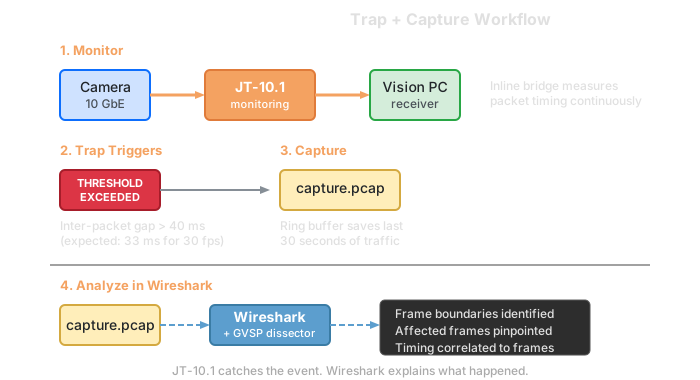
The JT-10.1 catches the event and preserves evidence. Wireshark with industrial protocol dissectors shows which connection faulted. PLC diagnostics confirm what the controller saw.
Complementary Tools
| Tool | What It Does |
|---|---|
| Wireshark | Decode captured packets, CIP/Modbus/OPC UA analysis |
| Softing Analyzer IE | Acceptance testing, PI-compliant reports |
| Hilscher netANALYZER | Deep protocol analysis with nanosecond timing |
| InduSol INspektor | 24/7 permanent PROFINET monitoring |
| PLC diagnostics | Which connection faulted, error codes |
Test Setup
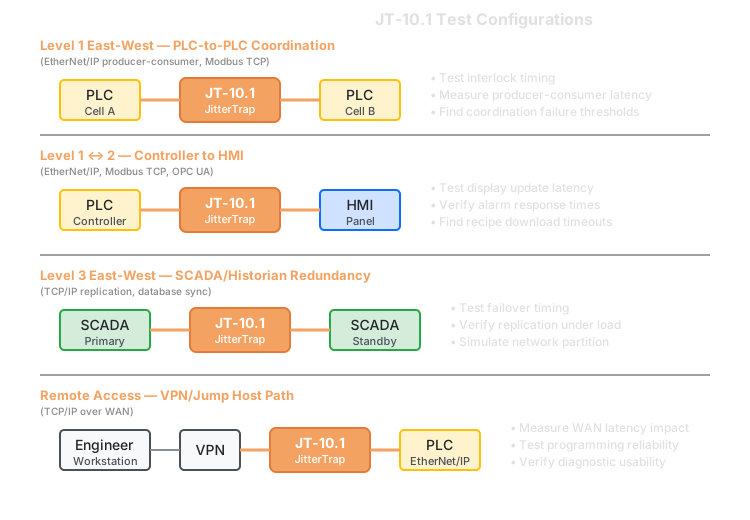
The JT-10.1 deploys inline as a transparent bridge. All traffic passes through while timing is measured and thresholds are monitored.
PLC to switch: Catch timing issues on the controller's network connection.
Between switches: Monitor inter-switch links where traffic aggregates.
At the uplink: See what's happening at the boundary between cells or between OT and IT networks.
What This Won't Help With
- Deterministic protocols (EtherCAT, PROFINET IRT) — timing enforced in hardware, not TCP/IP
- Safety protocols (CIP Safety, PROFIsafe) — specialized mechanisms below TCP/IP
- Protocol configuration issues — wrong IP, misconfigured RPI, tag mismatches
- Controller logic problems — if the code is wrong, the network can't fix it
Debugging intermittent industrial network faults? Contact us to discuss your setup.